

Riverside Online Testing 2026 Preparation Guide for CogAT


With remote learning becoming more and more common these days, many schools are using the Riverside Online Test (commonly known as CogAT) to assess students’ grasp of knowledge! Whether you’re a student aiming for a high score or a teacher helping students prepare, this super practical guide has got you covered! Join WuKong Education to unlock exam secrets and tackle this online test with ease!
What is Riverside Online Test?

Riverside online testing refers to digital assessment delivery through Riverside Insights platforms, especially DataManager, which supports assessments such as CogAT (Cognitive Abilities Test), , Iowa Assessments, Logramos, and IowaFlex. Riverside describes DataManager as an online scoring and reporting platform for student ability and achievement assessments.
Discovering the maths whiz in every child,
that’s what we do.
Suitable for students worldwide, from grades K-12.
Get started free!For many families, the most familiar assessment is CogAT, the Cognitive Abilities Test. It measures verbal, quantitative, and nonverbal reasoning rather than school-taught facts alone. Riverside’s CogAT overview states that the assessment provides information about students’ verbal, quantitative, and figural reasoning in less than two class periods. CogAT overview brochure
Online delivery is now common. Riverside has stated that more than half of all CogAT testing is conducted online, and that online administration supports remote, proctor-led, and self-paced/audio formats.
Test Date of Riverside Online Test
The time and date for the Riverside Online Test may vary depending on the institution administering it. Students could have a testing window that extends 30 days before and 30 days after the designated test event date. This flexibility allows you to administer tests to multiple schools within that timeframe. Some schools may schedule the test during regular class hours, while others may hold it after school or on weekends. It is essential to check with your school or institution to confirm the specific test date and time.
Fees of Riverside Online Testing for CogAT
The fees for the Riverside Online Test varies depending on the educational institution administering the test. However, most schools cover these fees for their students, making it free of charge for them. In some cases, there may be a nominal fee for students who wish to retake the 2025 test or for non-students who want to take the assessment.
Frequency and Format for Riverside Online Test
Students can usually only take the Riverside Online Test once per year. However, some schools may offer additional testing dates if needed. It is essential to check with your school or institution regarding their policies on test frequency.
The Riverside Online Test is a computer-based assessment with multiple-choice and technology-enhanced questions. The test is designed to measure the students’ critical thinking, problem-solving, and analytical skills in various subjects. It typically takes around 2-3 hours to complete, but this may vary depending on the student’s pace. It is essential to familiarize yourself with the test format and practice using technology-enhanced questions before taking the actual test.
The test frequency and format of Riverside Online Testing, including the CogAT assessment, can vary depending on the specific requirements and preferences of the educational institution or organization administering the assessments. Here are some general considerations:
- Test Frequency: The frequency of administering Riverside Online Tests, including CogAT, can be determined by the educational institution. It can vary from once a year to multiple times per year, depending on the assessment needs and goals.
- Test Format: The format of the Riverside Online Tests, including CogAT, typically involves online administration through a secure browser. The tests are designed to be interactive and may include multiple-choice questions or other question types that assess various cognitive abilities, such as verbal, quantitative, and nonverbal reasoning.
- Adaptive Testing: Some assessments offered through Riverside Online Testing, including CogAT, may utilize adaptive testing. Adaptive tests adjust the difficulty level of questions based on the student’s responses, providing a more precise assessment of their abilities.
Why is the Riverside Online Test Important?
The move from paper to digital assessment is part of a larger K-12 trend. The National Center for Education Statistics notes that digital tools are now part of the learning environment and that NAEP has been transitioning from paper-and-pencil to digitally based assessments.
For families, the biggest difference is experience. Your child may need to follow on-screen directions, use a secure browser or testing app, listen to audio instructions, and manage time without writing directly in a booklet.
| Paper Testing | Riverside Online Testing |
|---|---|
| Physical booklets and answer sheets | Digital test sessions through DataManager |
| Manual material handling | Less shipping and fewer paper logistics |
| Results may take longer | Riverside notes online results can be available within 24 hours |
| Familiar pencil-based workflow | Requires comfort with screen navigation |
| Same room administration | Can support in-school, remote, or blended testing windows |
Online testing can be more manageable, time-efficient, secure, and flexible for districts, but students still benefit from practice with the digital environment before test day.
Understanding the CogAT Online Test Format
Test Batteries Breakdown
The CogAT online test is organized around three reasoning batteries:
Verbal Battery: Students work with relationships among words, pictures, or sentences. Younger students may see picture-based tasks, while older students work more with text.
Quantitative Battery: Students solve number relationships, number puzzles, and number series. This section is less about memorized formulas and more about seeing patterns.
Nonverbal Battery: Students solve figure matrices, paper folding, and figure classification problems. These tasks measure visual-spatial reasoning and pattern recognition.
Riverside’s CogAT materials list different subtests for Levels 5/6-8 and Levels 9-17/18, with older students generally moving from picture-based to more text-based verbal and quantitative items. CogAT overview brochure
Grade-Level Structure
| Grade Level | Common CogAT Level |
|---|---|
| Kindergarten | Level 5/6 |
| Grade 1 | Level 7 |
| Grade 2 | Level 8 |
| Grade 3 | Level 9 |
| Grades 4-10 | Levels 10-16 |
| Grades 11-12 | Levels 17/18 |
Riverside notes that Levels 5/6-8 are untimed because they are designed to measure how well young students solve reasoning problems, not how quickly. Levels 9-17/18 are timed at 10 minutes per subtest.
Technology-Enhanced Features
CogAT online testing may include audio directions. Riverside says CogAT supports audio directions in eight languages, including English, Spanish, Arabic, Mandarin, Cantonese, Russian, Somali, and Vietnamese.
Riverside system requirements: For devices, Riverside system requirements include Windows, Mac, Chromebook, and supported iPad models, though districts should always follow the latest local technical guidance.
One important parent note: do not assume every CogAT administration is adaptive. Some Riverside assessments and configurations may use different delivery models, but standard CogAT online testing is typically assigned by level and form. Ask your school whether your child’s specific assessment is fixed-form, adaptive, proctor-led, self-paced, or audio-administered.
Step-by-Step Preparation Guide
Step 1: System Check & Setup
Run the system check on the same device your child will use for testing. For remote testing, Riverside’s pre-check page tells students to confirm internet access, webcam, microphone, and navigation readiness before the test.
Use this checklist:
| Item | What to Check |
|---|---|
| Device | Approved laptop, desktop, Chromebook, or iPad |
| Internet | Stable connection, no heavy streaming nearby |
| Camera and microphone | Required for some remote proctoring setups |
| Browser or app | Follow school instructions exactly |
| Power | Plug in or fully charge before testing |
| Space | Quiet, clear desk, minimal distractions |
Step 2: Understand the Question Types
Do not drill copyrighted test items. Instead, help your child understand the thinking behind each type.
Original verbal example: “Bird is to nest as bee is to ____.” The child should identify the relationship: an animal and its home.
Original quantitative example: “2, 4, 8, 16, __.” The child should notice the doubling pattern.
Original nonverbal example: “Three shapes all have a shaded corner. Which new shape belongs with them?” The child should focus on shared visual features, not the first answer that looks familiar.
Step 3: Practice with Purpose
A strong plan is short, consistent, and targeted. Try 15-20 minutes per day, four or five days per week. Rotate among vocabulary, mental math, visual puzzles, and mixed reasoning questions.
The goal is not memorization. The goal is to help your child explain patterns, compare choices, eliminate weak answers, and recover from mistakes.
For extra structure, families can use programs such as WuKong Math for quantitative reasoning and WuKong English ELA for vocabulary, reading comprehension, and verbal thinking.
Step 4: Master Time Management
For older students, timed subtests mean pacing matters. Teach your child to answer confident questions first, mark harder ones mentally, and avoid spending too long on a single item.
A helpful rule is: “Try, choose, and move.” If your child is stuck after a reasonable effort, they should eliminate obviously wrong choices and make the best available answer.
Step 5: Follow a Calm Test Day Protocol
The night before, prepare the device, charger, login details, scratch paper if allowed, and a water bottle for breaks. Keep the morning ordinary: breakfast, simple encouragement, and no last-minute pressure.
During the test, remind your child to read or listen to directions carefully. If the internet drops or the screen freezes, they should alert the proctor or adult immediately rather than clicking around.
7 Proven Strategies to Boost Your Child’s Score
- Practice with a digital interface so the screen format feels familiar.
- Build vocabulary through daily reading and short word discussions.
- Strengthen mental math with number patterns and estimation.
- Use puzzles, tangrams, blocks, and visual games for spatial reasoning.
- Teach process of elimination for multiple-choice questions.
- Practice calm breathing before timed sections.
- Review mistakes by asking, “What pattern did I miss?”
Understanding the CogAT Results
CogAT reports may include Raw Score, Universal Scale Score, Standard Age Score, Percentile Rank, Stanine, and Ability Profile. Riverside defines Percentile Rank as the percentage of students in the same age or grade group who scored lower, and Standard Age Score as a normalized score with a mean of 100. Riverside score descriptions
Parents should avoid treating one score as a permanent label. A CogAT profile is best used as a learning map: it can show whether your child tends to reason more strongly with words, numbers, visual patterns, or a balanced mix of all three.
FAQs
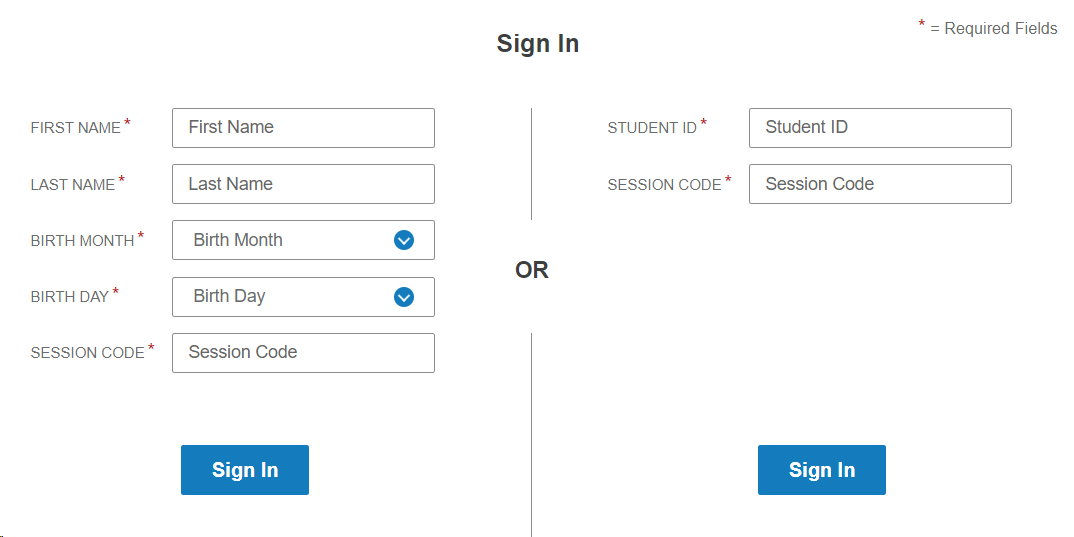
In most cases, students log in using the credentials or session details provided by their school (for example, a student ID and/or test session information). If you see a message indicating multiple students match the same ID, you may be prompted to select the correct student profile before continuing.
Riverside’s pre-check guidance indicates you should use the same laptop/desktop/Chromebook you plan to test on, with a stable internet connection. For remote-proctored sessions, your device typically needs a working webcam and microphone.
Usually, CogAT is used for ability insights, gifted identification, placement, or instructional planning, not as a classroom grade. Confirm with your district because local policies vary. test.
Riverside says online testing can provide results within 24 hours, though parent access depends on school reporting timelines.
Sometimes. Riverside notes that CogAT offers equivalent forms for retesting, but retake rules are set by schools or districts.
Discovering the maths whiz in every child,
that’s what we do.
Suitable for students worldwide, from grades K-12.
Get started free!
Graduated from Columbia University in the United States and has rich practical experience in mathematics competitions’ teaching, including Math Kangaroo, AMC 8… He teaches students the ways to flexible thinking and quick thinking in sloving math questions, and he is good at inspiring and guiding students to think about mathematical problems and find solutions.


Comments0
Comments